
HANA News Blog
FAQ: SUSE Hypervisor for SAP (KVM)
KVM as alternative with low TCO
Last update: 06-07-2026
KVM is besides VMware and PowerVM the only certified virtualization alternative for SAP HANA. Be aware that RHEL KVM is not supported anymore for productive usage. Only SUSE KVM can be used for productive SAP HANA workloads to be certified and supported.
Within this article we will clarify the most frequent ask questions we are facing within our customer projects. Currently a lot of questions are rising and not each customer scenario can be covered. This also means that the list will be updated in the future.
1.What KVM stands for?
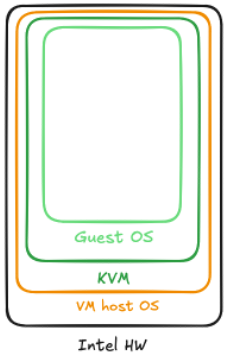
KVM is an acronym for Kernel-based Virtual Machine. Like ESXi KVM is running as linux on top of the bare metal server as hypervisor to create the foundation to create multiple VMs. The official product name in the SAP context for KVM is SUSE Hypervisor for SAP. This is the reason we are using this wording in this article.
2. Is SUSE Hypervisor for SAP certified for SAP HANA?
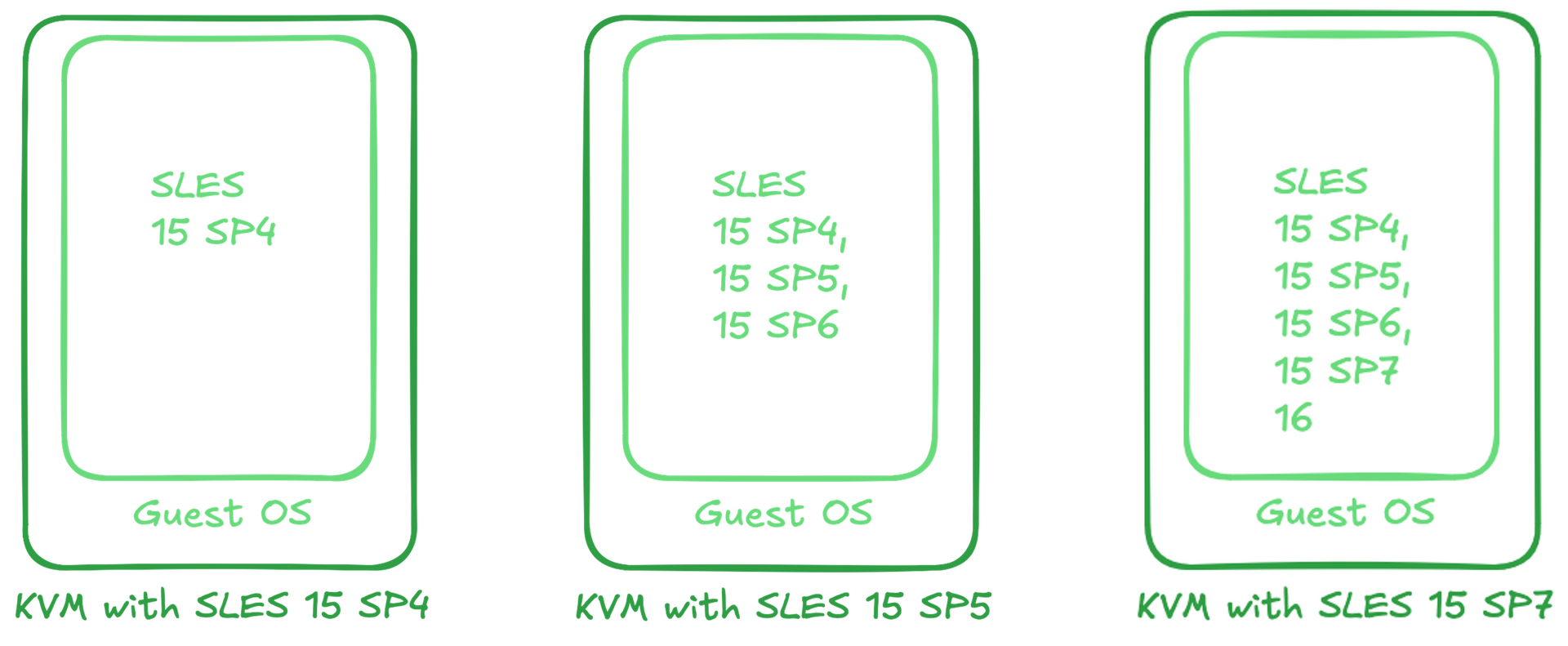
Yes, it is. But there are as always some restrictions and dependencies with each release. Currently (07/2026) KVM with SLES 15 SP4, SLES 15 SP5 and SLES 15 SP7 are supported to use it as production environment for SAP HANA. Please always check which SLES versions can run on top of the used KVM version.
3. Which hardware can be used for SUSE Hypervisor for SAP?
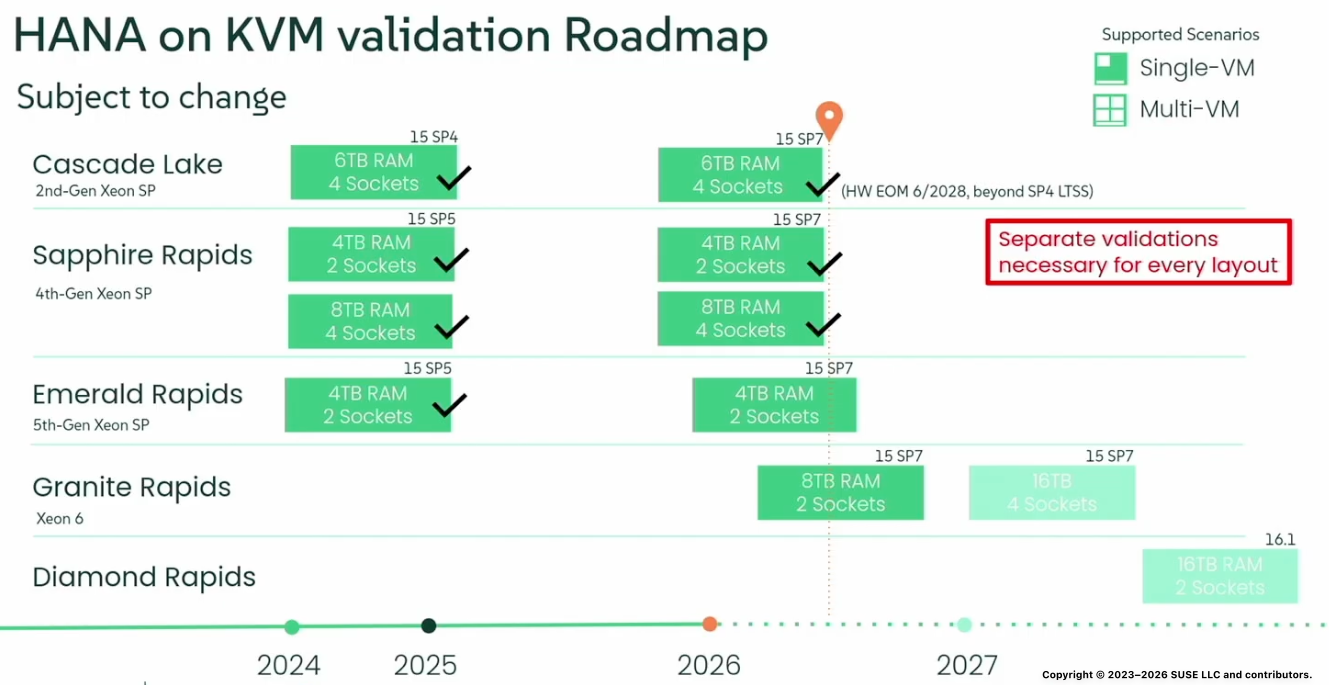
Only specific processor generations of Intel are certified for productive usage connected with the certification of the specific KVM release (SLES as hypervisor). This is the current roadmap which is subject to change. You can verify the current status via SAP Note 3430656:
- KVM hypervisor as part of SUSE Linux Enterprise Version for SAP Applications 15 SP4 - See SAP Note 3366235 for specific information and constraints.
- KVM hypervisor as part of SUSE Linux Enterprise Version for SAP Applications 15 SP5 - See SAP Note 3538596 for specific information and constraints.
- KVM hypervisor as part of SUSE Linux Enterprise Version for SAP Applications 15 SP7 - See SAP Note 3741904 for specific information and constraints.
This means in other words for the Intel Generations:
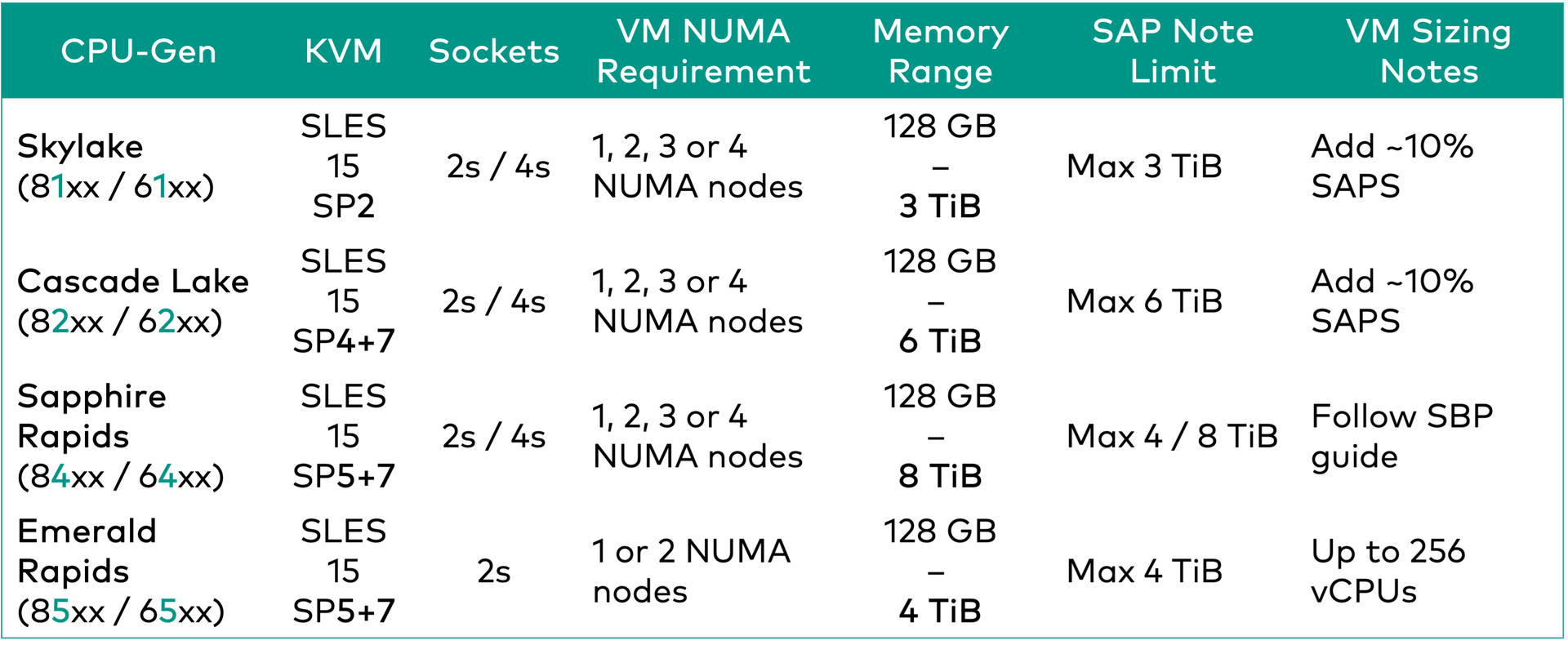
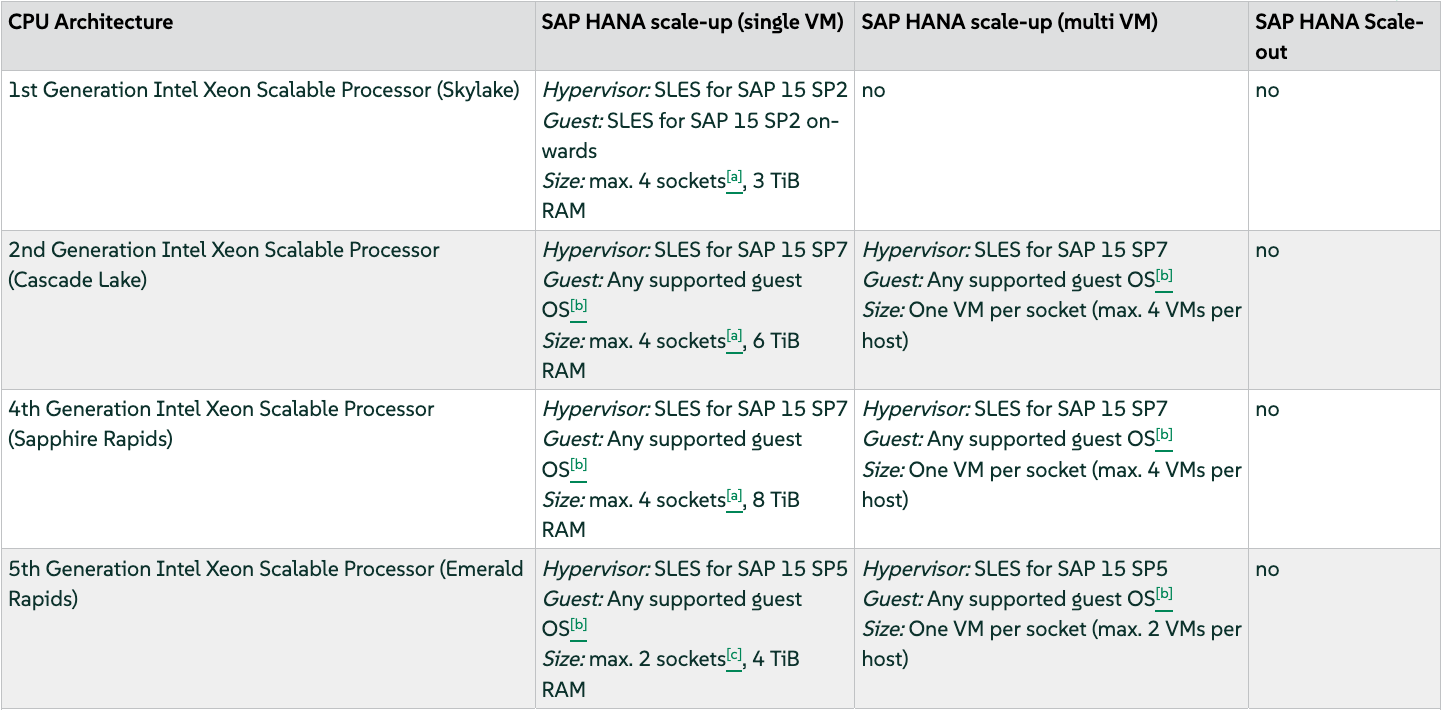
Details: SBP SLES15 SP7
4. Which subscription is needed?
To use SUSE Hypervisor for SAP (KVM) as hypervisor for SAP HANA or SAP Application servers you need an "Unlimited Virtual Machines" subscription. You can only use it in connection with a SUSE Linux Enterprise Server for SAP applications 15 SPx "Unlimited Virtual Machines" subscription. This means SLES4SAP is mandatory!
5. Which sizing rules I have to consider?
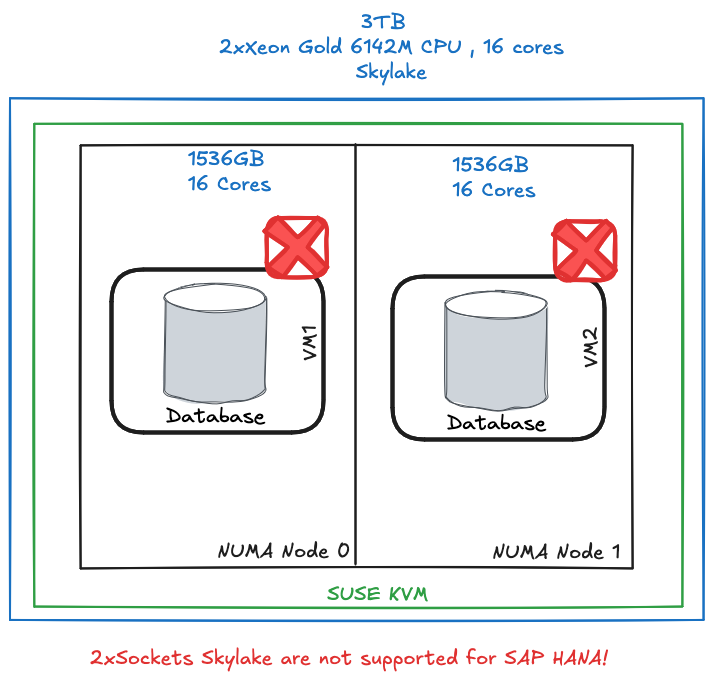
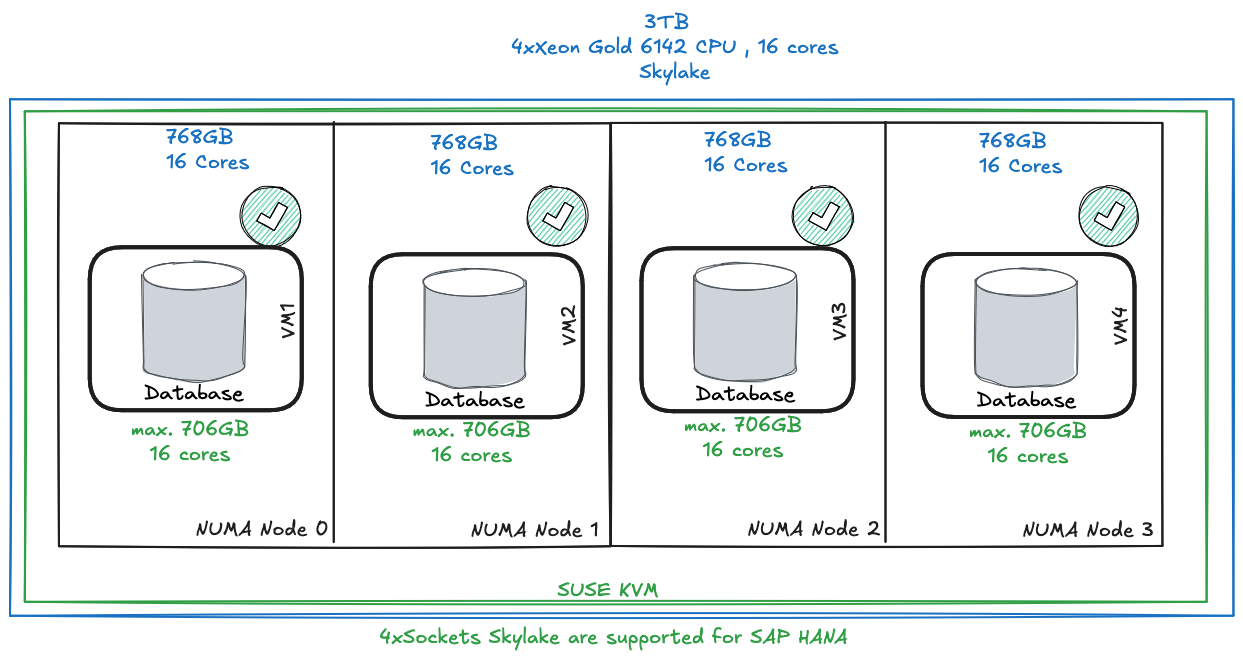
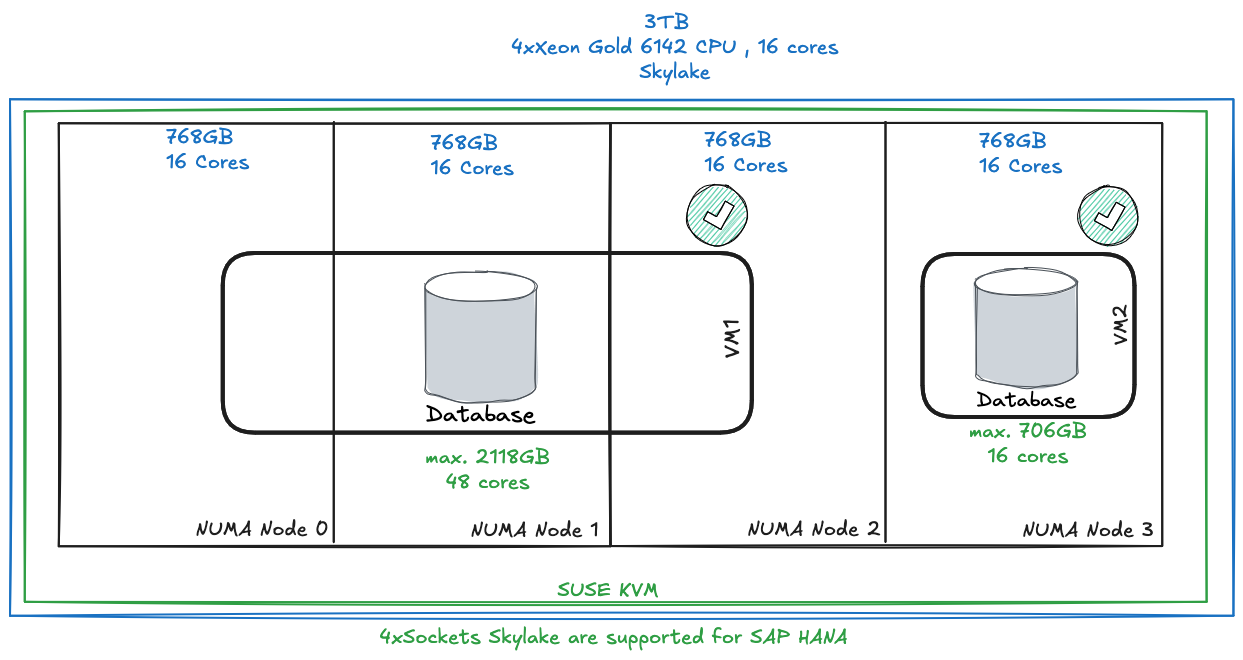
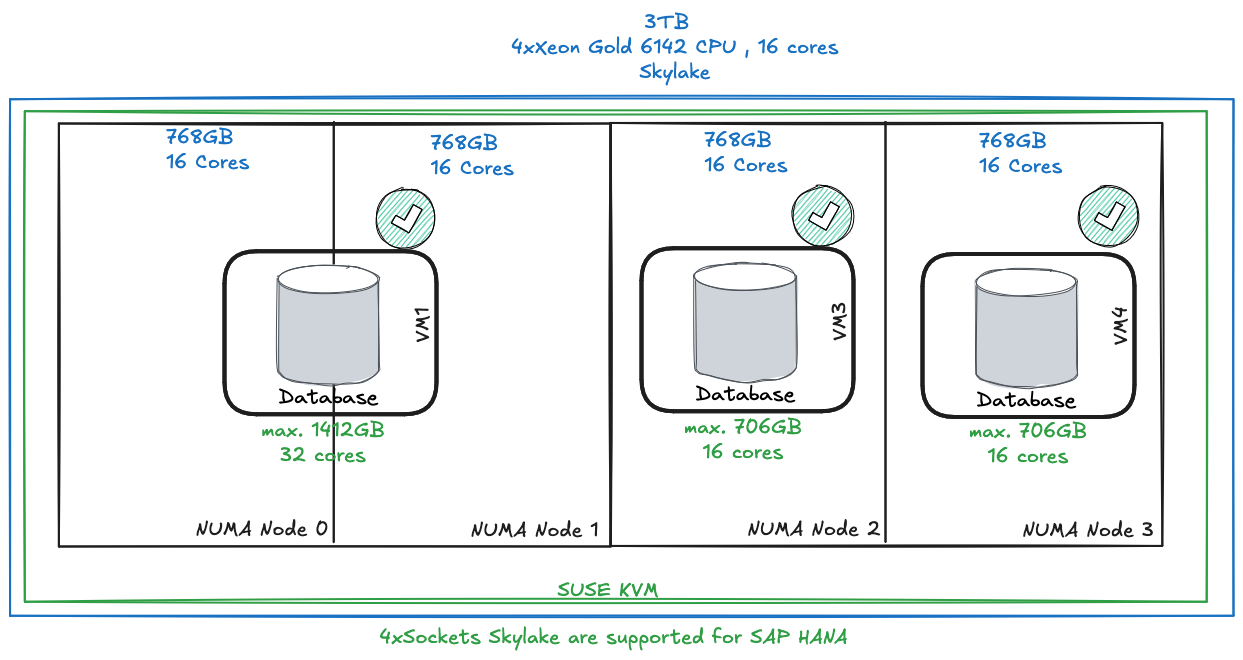
It is nearly the same like for VMware. You can only scale with full sockets. You cannot use half sockets or NUMA node sharing. With VMware you could use half NUMA nodes or COD/SNC. This is currently not supported / certified.
It is recommended to reserve a minimum of about 8% of the hosts’s main memory for the hypervisor.
The hypervisor will consume CPU capacity, approximately 5% to 10% of the SAPS capacity, depending on the workload characteristics:
- 5% of the SAPS capacity for mainly analytical workloads
- 10% of the SAPS capacity for mainly transactional workloads
It is however not required to dedicate CPUs to the hypervisor.
Since SAP HANA runs inside the VM, it is the RAM size of the VM which needs to satisfy the memory requirements of the SAP HANA Memory sizing.
The memory used by the VM must be smaller than the physical memory of the machine. It is recommended to reserve at least 8% of the total memory reported by “/proc/meminfo” (in the “MemTotal” field) for the hypervisor. This leaves ~ 92% to the VM.
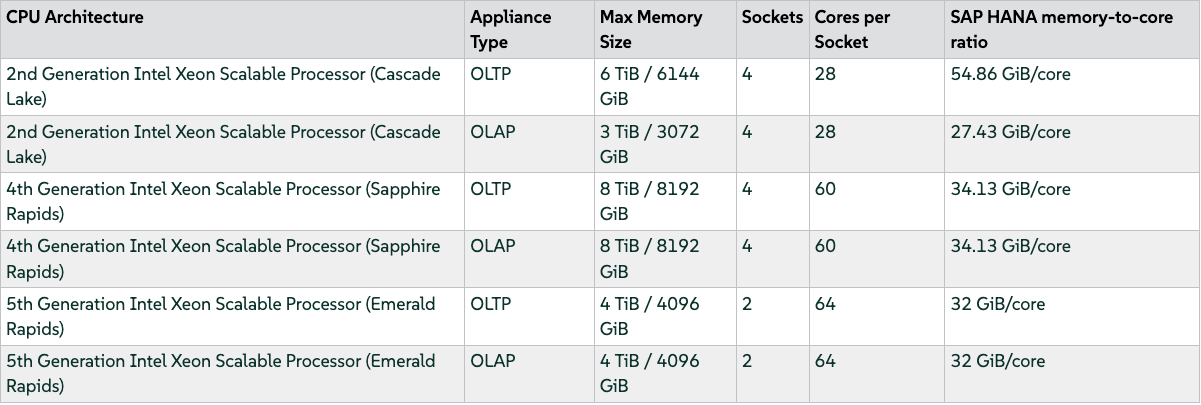
Please be aware that you only can use full sockets. If you have a 2 Socket Emerald Rapid host with 4 TiB. You can run max. productive 2 VMs. One VM per socket.
4 TiB / 2 = 2 TiB
2 TiB * 0.92 = 1.84 TiB
The max. memory you can assign to both VMs are 1.84 TiB of memory. If you just want to run 1 big VM: 4 TiB * 0.92 = 3.68 TiB.
If you SAP HANA sizing is above 1.84TiB you have two options:
- use both sockets and waste resources
- optimize the sizing with data tiering methods
SBP-SLES4SAP-HANAonKVM-SLES15SP5 - memory-to-core ratio examples
Another example with Skylake processor (keep in mind - only supported with SUSE KVM Virtualization with SLES 15 SP4):
6. Which are the most popular limitations for SUSE KVM (SUSE Hypervisor for SAP)?
- only SLES15 SP4 + SP5 + SP7 as hypervisor version supported
- no NUMA node sharing
- no live migration for SAP HANA (for application server you can use it)
- no scale-out support
- no Ice Lake support
- Mostly 4 socket support of Intel generations
- no support for > 8TB+
- minimum size of an SAP HANA instance in a virtual machine on SUSE KVM is 8 vCPUs based on 8 physical cores and 128 GB
- KVM HA is not supported. Solutions based on HA solutions for automated SAP HANA system replication in HANA scale-up are supported.
7. What are the main differences between VMware and SUSE Hypervisor for SAP?
SUSE is only offering a virtualization solution. It means that there a feature gaps if you compare the two products. VMware/Broadcom is covering a way more features as bundle within the new licensing model. For instance this includes for the SUSE KVM no UI for administration/monitoring and some features like Fault Tolerance (FT), vMotion or NSX are currently not part of the product, not certified or even planned. If you are already using such features and want to stick to them you cannot easily replace this products. If you are just using VMware as simple virtualization layer the SUSE option with KVM may be an alternative for you.
8. How you can migrate your workload?
Option 1: Simple Backup / restore
Option 2: HSR
Option 3: Storage move (not officially supported)
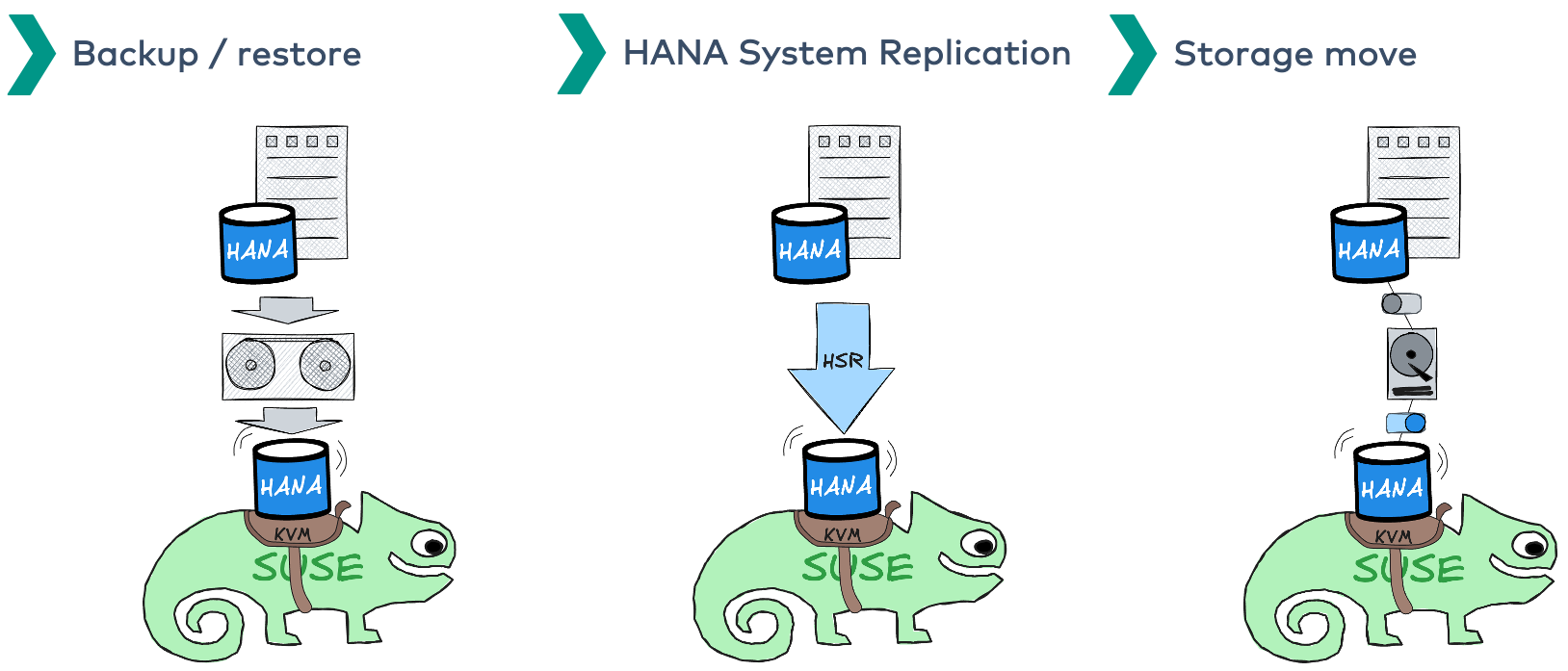
9. What migration scenarios exist?
Scenario 1: wide VMs
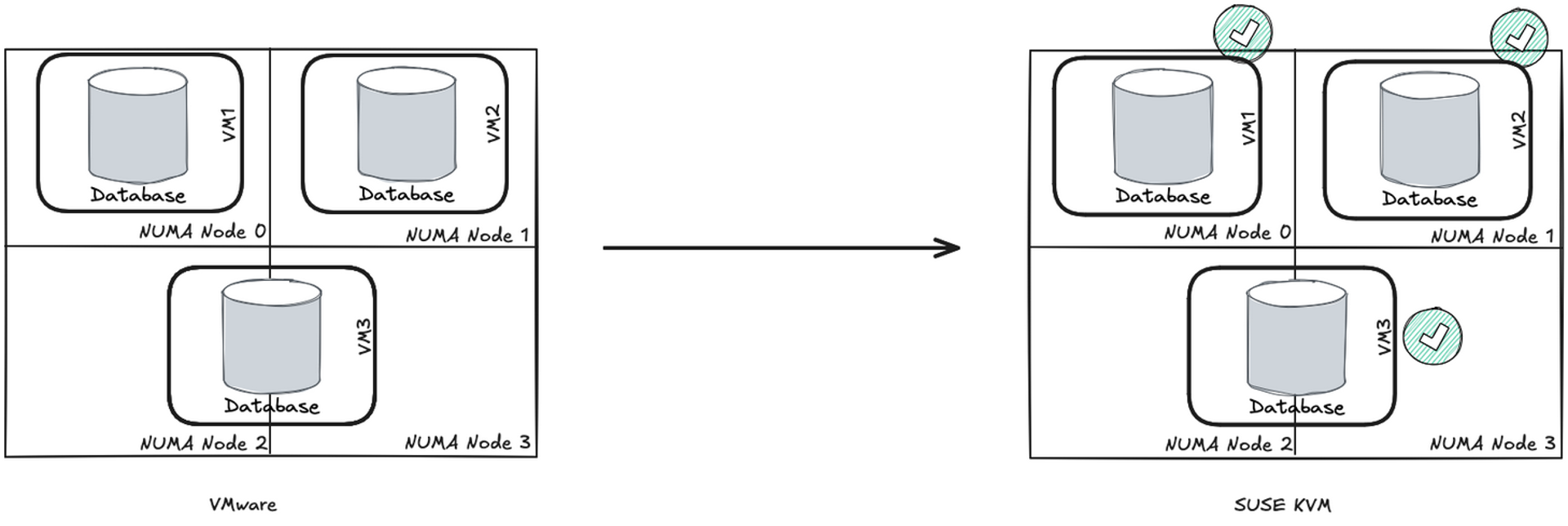
Scenario 2: half socket HANA VMs
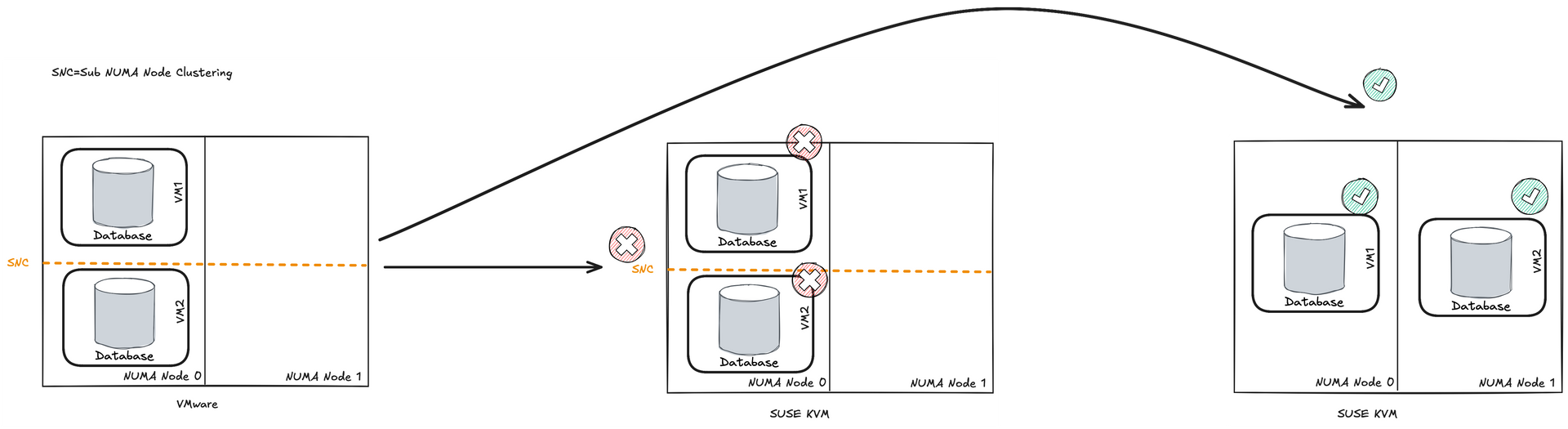
Scenario 3: optimize sizings for big instances (8TB+)
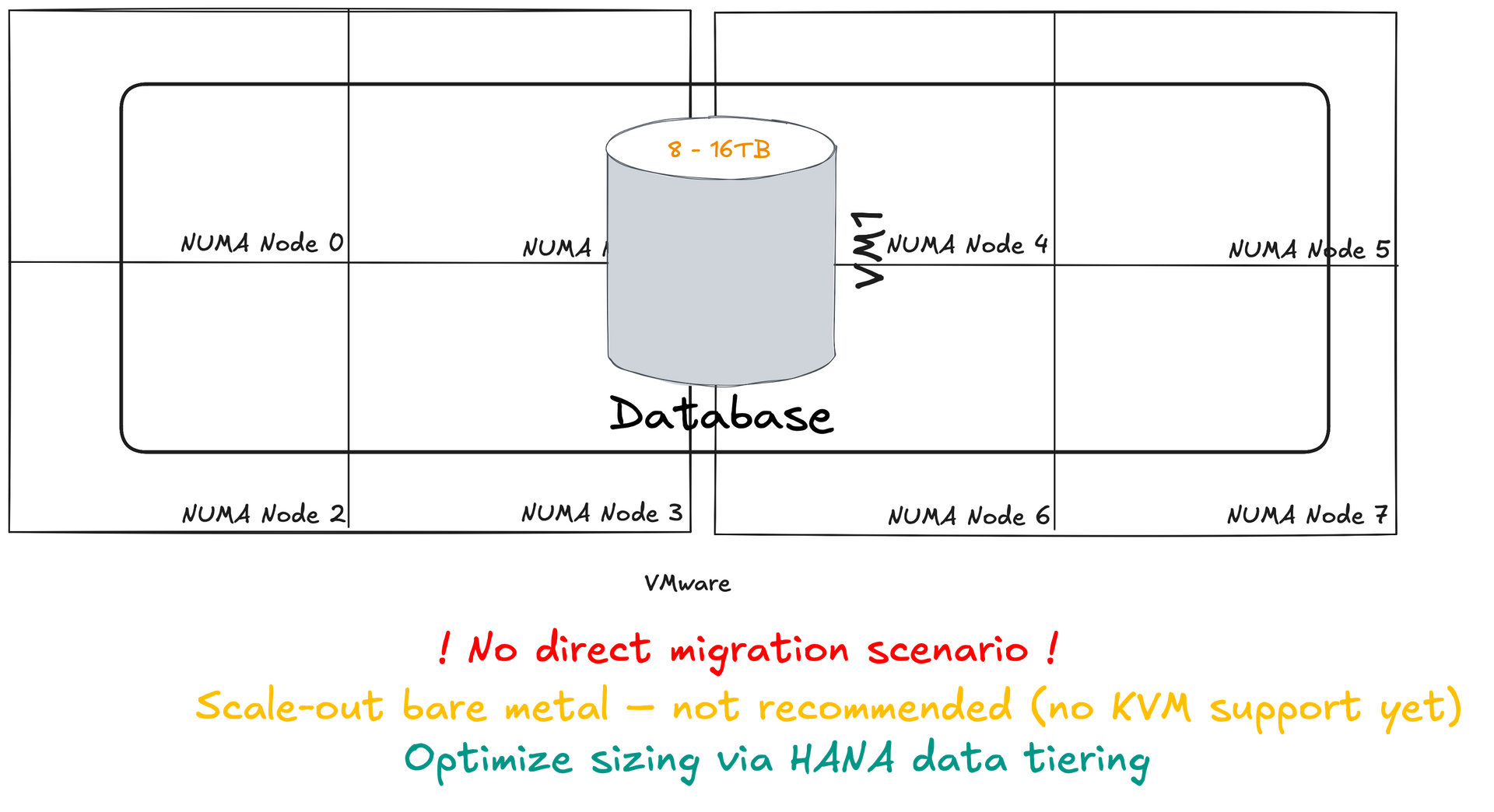
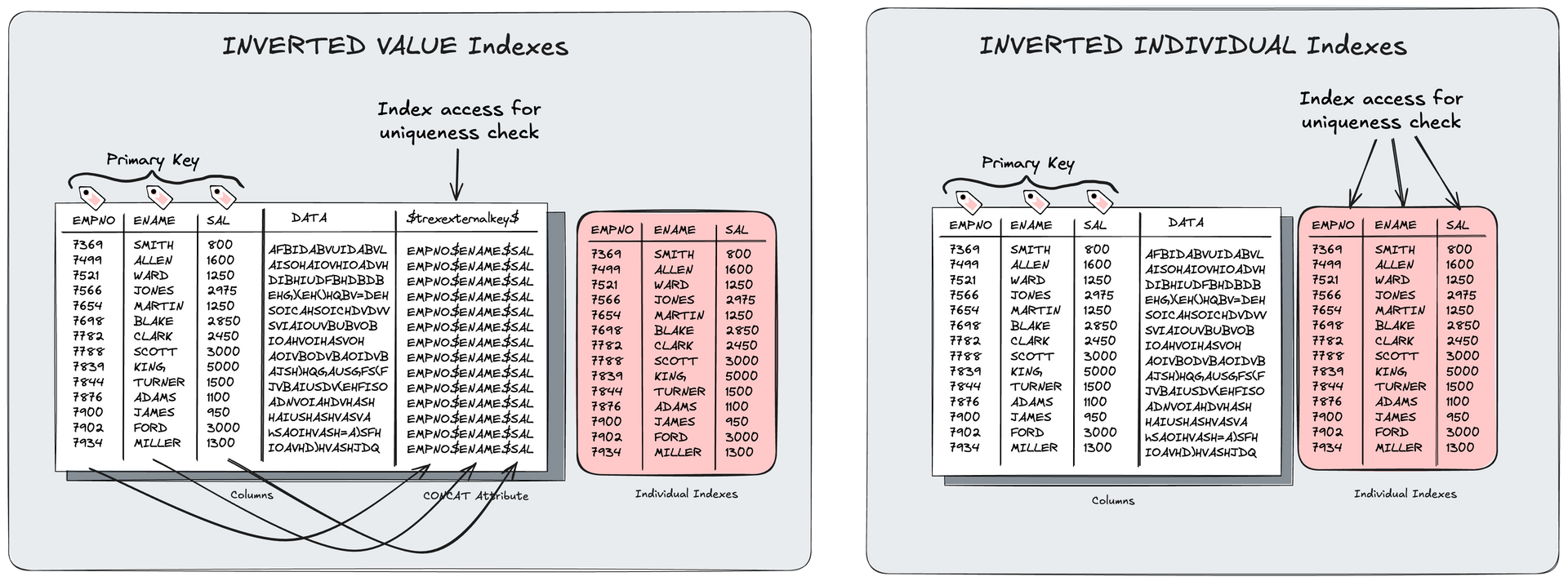
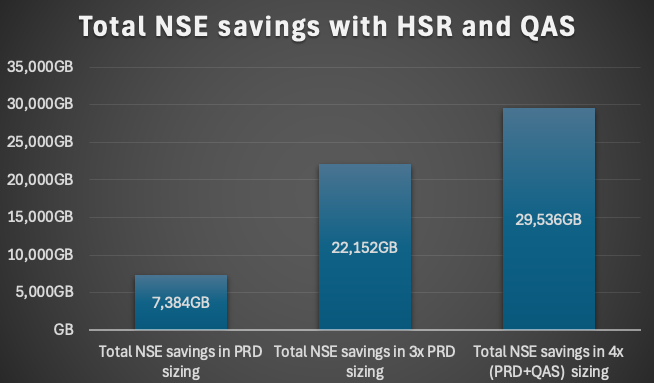
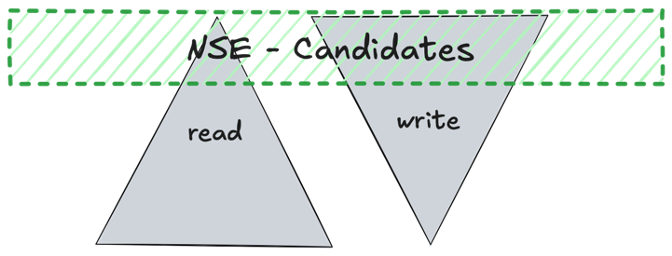
First optimize you sizing before you migrate the workload. You can achieve a saving of up to 40% with data tiering methods like NSE, Inverted Individual Indexes, VARBINARY to LOB and other possibilities to reduce the instance sizing for HANA.
10. Which features besides pure virtualization are provided by SUSE Hypervisor for SAP?
- migration capabilities
- live migration
- snapshots
- monitoring
- cloning
11. Which migration capabilities are offered?
Live migration
The source VM continues to run while its configuration and memory are transferred to the target host. When the transfer is complete, the source VM is suspended and the target VM is resumed.
Live migration is useful for VMs that need to be online without any downtime. It is not supported for productive SAP HANA systems. You can use it for non-productive systems or application server workload in the SAP context.
Non-live migration
The source VM is suspended and its configuration and memory are transferred to the target host. Then the target VM is resumed.
Non-live migration is more reliable than live migration, although it creates downtime for the VM. If downtime is tolerable, non-live migration can be an option for VMs that are difficult to live migrate.
Offline migration
The VM definition is transferred to the target host. The source VM is not stopped and the target VM is not resumed.
Offline migration can be used to migrate inactive VMs.
Xen to KVM migration
As the KVM virtualization solution is becoming more and more popular among server administrators, many of them need a path to migrate their existing Xen based environments to KVM. As of now, there are no mature tools to automatically convert Xen VMs to KVM. There is, however, a technical solution that helps convert Xen virtual machines to KVM.
The migration procedure via virt-v2v described by the SUSE documentation is not fully supported by SUSE.
12. How snapshots can be used with KVM?
VM Guest snapshots are snapshots of the complete virtual machine including the state of CPU, RAM, devices and the content of all writable disks. To use virtual machine snapshots, all the attached hard disks need to use the qcow2 disk image format, and at least one of them needs to be writable.
Snapshots let you restore the state of the machine at a particular point in time. This is useful when undoing a faulty configuration or the installation of a lot of packages. After starting a snapshot that was created while the VM Guest was shut off, you need to boot it. Any changes written to the disk afterward are lost when starting the snapshot.
Attention:
Snapshots are supported on KVM VM Host Servers only.
Internal snapshots
Snapshots that are saved into the qcow2 file of the original VM Guest. The file holds both the saved state of the snapshot and the changes made since the snapshot was taken. The main advantage of internal snapshots is that they are all stored in one file and therefore it is easy to copy or move them across multiple machines.
External snapshots
When creating an external snapshot, the original qcow2 file is saved and made read-only, while a new qcow2 file is created to hold the changes. The original file is sometimes called a backing or base file, while the new file with all the changes is called an overlay or derived file. External snapshots are useful when performing backups of VM Guests. However, external snapshots are not supported by Virtual Machine Manager, and cannot be deleted by
virsh
directly.
Live snapshots
Snapshots created when the original VM Guest is running. Internal live snapshots support saving the devices, and memory and disk states, while external live snapshots with
virsh
support saving either the memory state, or the disk state, or both.
Offline snapshots
Snapshots created from a VM Guest that is shut off. This ensures data integrity as all the guest's processes are stopped and no memory is in use.
13. Which tools are provided by SUSE for administration / monitoring?
Virtualization console tools
virsh (Package: libvirt-client)
A command-line tool to manage VM Guests with similar functionality as the Virtual Machine Manager. virsh allows you to change a VM Guest's status, set up new guests and devices, or edit existing configurations. virsh is also useful to script VM Guest management operations.
virt-install
(Package: virt-install)
A command-line tool for creating new VM Guests using the
libvirt
library. It supports graphical installations via VNC or SPICE protocols. Given suitable command-line arguments,
virt-install
can run unattended. This allows for easy automation of guest installs.
virt-install
is the default installation tool used by the Virtual Machine Manager.
remote-viewer
(Package: virt-viewer)
A simple viewer of a remote desktop. It supports SPICE and VNC protocols.
virt-clone
(Package: virt-install)
A tool for cloning existing virtual machine images using the
libvirt
hypervisor management library.
virt-host-validate
(Package: libvirt-client)
A tool that validates whether the host is configured in a suitable way to run
libvirt
hypervisor drivers.
virt-top
virt-top is a command-line tool similar to the well-known process monitoring tool top
Virtualization GUI tools
The following libvirt-based graphical tools are available on SUSE Linux Enterprise Server. All tools are provided by packages carrying the tool's name.
Virtual Machine Manager (package: virt-manager)
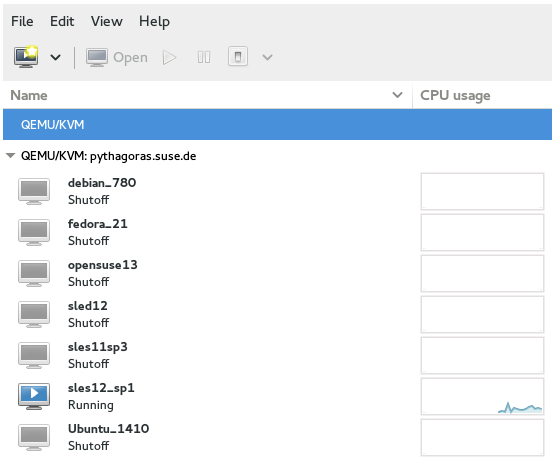
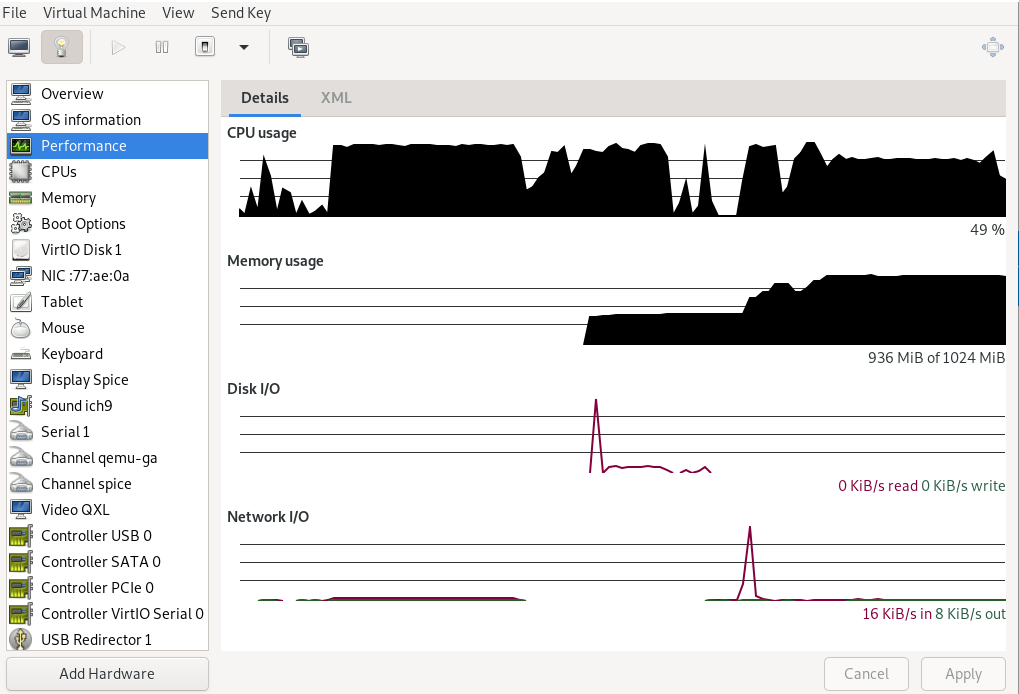
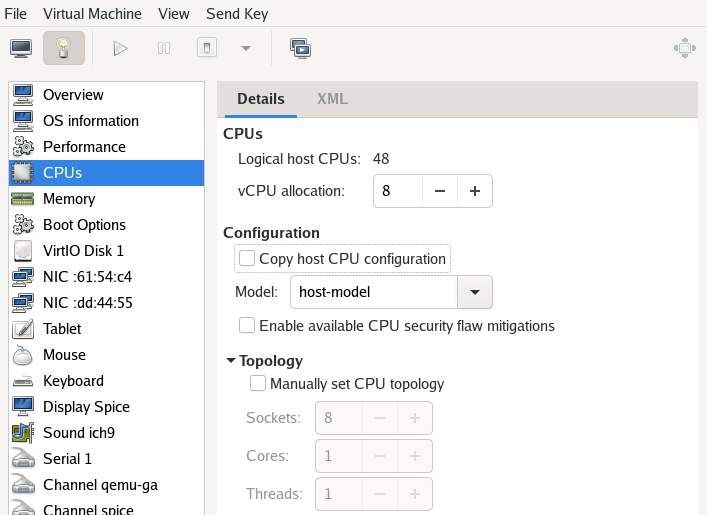
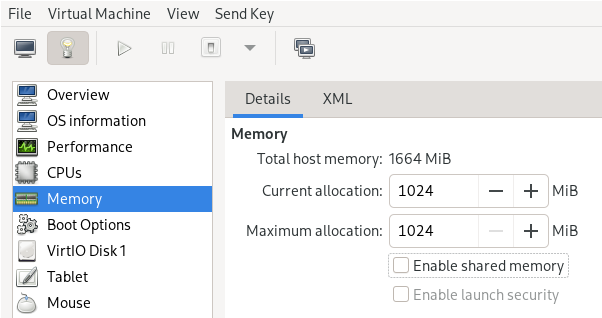
The Virtual Machine Manager is a desktop tool for managing VM Guests. It provides the ability to control the lifecycle of existing machines (start/shutdown, pause/resume, save/restore) and create new VM Guests. It allows managing multiple types of storage and virtual networks. It provides access to the graphical console of VM Guests with a built-in VNC viewer and can be used to view performance statistics.
virt-manager
supports connecting to a local
libvirtd
, managing a local VM Host Server, or a remote
libvirtd
managing a remote VM Host Server.
Monitoring with
virt-top
virt-top
is a command-line tool similar to the well-known process monitoring tool
top
.
virt-top
uses libvirt and therefore is capable of showing statistics for VM Guests running on different hypervisors. It is recommended to use
virt-top
instead of hypervisor-specific tools like
xentop
.
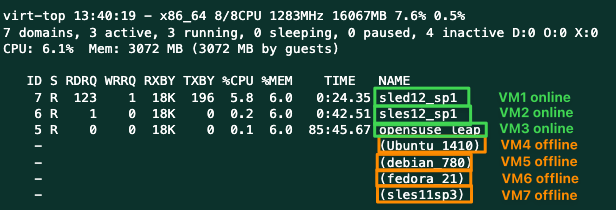
By default
virt-top
shows statistics for all running VM Guests. Among the data that is displayed is the percentage of memory used ( %MEM
) and CPU ( %CPU
) and the uptime of the guest ( TIME
). The data is updated regularly (every three seconds by default). The following shows the output on a VM Host Server with seven VM Guests, four of them inactive:
Sources
SUSE Best Practices for SAP HANA on KVM SLES4SAP 15 SP4
SUSE Best Practices for SAP HANA on KVM SLES4SAP 15 SP5
SUSE Best Practices for SAP HANA on KVM SLES4SAP 15 SP7
3366235 - SAP HANA on SUSE KVM Virtualization with SLES 15 SP4
3538596 - SAP HANA on SUSE KVM Virtualization with SLES 15 SP5
3741904 - SAP HANA on SUSE KVM Virtualization with SLES 15 SP7
SAP HANA News by XLC